
Short answer
Office 365 email security is the configuration of Microsoft Defender for Office 365 and the built in protection every cloud mailbox has: anti phishing and impersonation settings, anti malware, Safe Links, Safe Attachments, quarantine and user reporting. It also means SPF, DKIM and DMARC on every sending domain, with DMARC moved toward reject. Ethereum Tech configures and documents this alongside your IT team or MSP.
Check where you stand: take the Microsoft 365 security check. About two minutes, no email needed.
Office 365 email security is no longer just a mailbox setting. If your organization runs Microsoft 365, phishing, spoofing, business email compromise, and weak authentication controls can affect daily operations, customer trust, cyber insurance renewals, and audit readiness all at once.
Ethereum Tech helps organizations secure Microsoft 365 and Azure environments with hands on engineering and compliance focused support. For Office 365 email security, that means we help you strengthen Exchange Online and related Microsoft 365 controls, configure layered protections, collect evidence, and get your environment ready for customer reviews, assessments, and internal security expectations.
Ethereum Tech supports Office 365 email security for regulated and contract driven organizations
Most teams do not come to us because they want a generic security checkup. They come to Ethereum Tech because there is a trigger: repeated phishing attempts, a customer security questionnaire, a cyber insurance renewal, leadership pressure to reduce risk, or a readiness effort tied to CMMC readiness, NIST based customer requirements, HIPAA aligned safeguards, SOC 2 readiness, or ISO 27001.
Ethereum Tech works especially well for small and midsize defense and government contractors, healthcare organizations, and other Microsoft 365 users that need practical email security improvements tied to real business requirements, not a long list of abstract recommendations.
200+ Microsoft 365 and Azure tenants. 100+ engagements.
Because we provide both advisory and hands on engineering, you get more than a gap list. We help identify what matters in your tenant, what needs to be changed, and what proof you will need to show later.
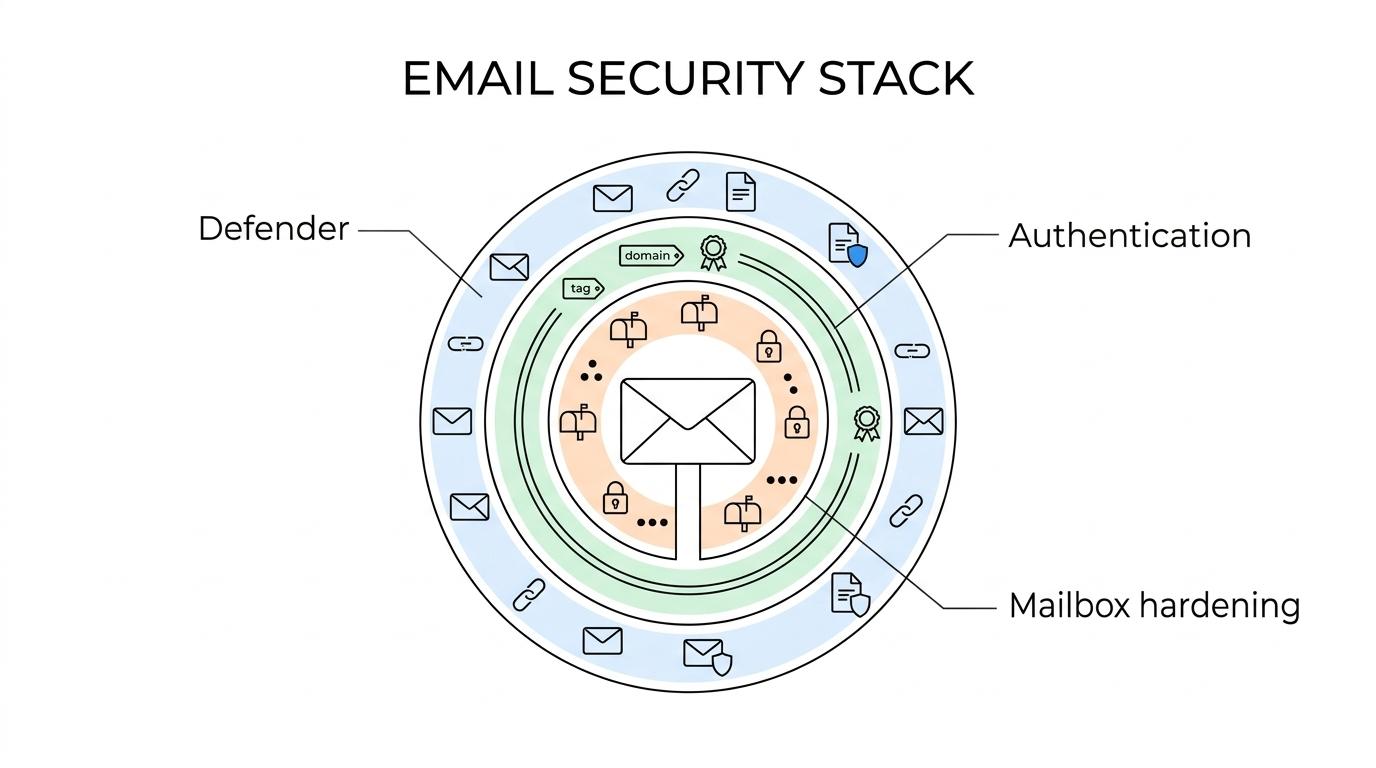
Layered Office 365 email security with Defender for Office 365, authentication controls, and anti phishing hardening
Microsoft describes Defender for Office 365 as the primary email and collaboration security solution for Microsoft 365. Ethereum Tech uses that layered model to review your built in protections, your Defender for Office 365 Plan 1 or Plan 2 capabilities, and the configuration gaps that can leave users exposed to phishing, zero day malware, spoofing, and business email compromise.
Phishing guidance from CISA, NSA, FBI, and MS-ISAC recommends setting DMARC to reject for the email your domain sends and checking DMARC on the email you receive. It also encourages small businesses with limited resources to consider managed cloud email services. Ethereum Tech turns that guidance into concrete Microsoft 365 configuration work so fraudulent email is harder to deliver, suspicious activity is easier to review, and your controls are easier to explain to internal stakeholders and external reviewers.
One tenant moved from 28% to 68% Microsoft Secure Score in six weeks. Your starting point and timing will differ.
A typical Office 365 email security engagement can include work such as:
- Defender for Office 365 configuration: anti phishing policies, anti malware protections, Safe Links, Safe Attachments, impersonation settings, quarantine workflows, and user submission paths
- Email authentication controls: SPF, DKIM, DMARC review, and reject policy planning where your mail flow supports stronger enforcement
- Mailbox and access hardening: risky default review, mailbox auditing, authentication exposure checks, and related Microsoft 365 security settings that affect email risk
Ethereum Tech focuses on the controls that reduce real exposure and produce usable evidence, not just the settings that look good in a presentation.
Microsoft 365 email security that supports CMMC readiness, HIPAA aligned work, SOC 2, ISO 27001, and cyber insurance evidence
Email security often becomes a compliance issue the moment someone asks for proof. A customer may want to see phishing protections, an insurer may ask about MFA and email filtering, or an assessor may want configuration evidence tied to a framework requirement. Ethereum Tech helps connect your Office 365 security work to those specific asks.
Ethereum Tech provides assessment ready evidence and documentation so your team is not scrambling for screenshots, policy references, control descriptions, and remediation records at the last minute. That is especially valuable when Microsoft 365 email controls support CMMC readiness and assessment preparation, NIST based customer requirements, HIPAA aligned safeguards, SOC 2 readiness, ISO 27001 readiness, or cyber insurance submissions.
When the security work is tied to a contract, questionnaire, or renewal, clarity matters. We start with the trigger behind the project and map your Microsoft 365 email controls to the requirements that actually affect your business.
Hands on Office 365 security implementation with your internal IT team or MSP
Some firms stop at advice. Ethereum Tech is built for teams that need implementation support as well. We work alongside internal IT teams and MSPs to configure controls, validate settings, collect evidence, and help close the gaps that often remain open after a standard assessment.
That approach saves time when your team already has day to day responsibilities and cannot pause everything to interpret Microsoft 365 security settings, licensing differences, or documentation expectations. Ethereum Tech gives you specialized Microsoft 365 and Azure security help without forcing you to replace your existing IT relationships.
Led by a security and compliance officer with 20+ years in regulated technology.
If your environment already has some protections enabled, we do not assume the job is done. We look at how the controls are configured, whether they align with your actual threat and compliance needs, and whether the evidence will hold up when someone asks for it.
When Ethereum Tech is the right fit for Office 365 email security
Ethereum Tech is a strong fit when your organization wants Microsoft 365 email security tied to a real operational or compliance outcome.
We are usually the right choice when:
- You use Office 365 or Microsoft 365 email and need stronger phishing, spoofing, and mailbox protection
- You need evidence for customer security reviews, cyber insurance renewals, or framework driven readiness work
- Your internal IT team or MSP needs specialized help with Microsoft 365 security configuration and validation
- You want hands on remediation and documentation, not only advisory guidance
Ethereum Tech is especially useful when the challenge is not understanding that email security matters, but knowing which Microsoft 365 controls to prioritize, how to configure them correctly, and how to document the work in a way that supports the next review.
Start with an Office 365 security review tied to your actual risk and requirements
If you need Office 365 email security that improves protection and gives you clearer evidence for audits, assessments, customer requests, or leadership review, Ethereum Tech can help you move from broad concern to specific Microsoft 365 actions.
Book a 30 minute call or call (786) 577-9743.
Frequently asked questions
What does Defender for Office 365 add to the protection every mailbox already has?
Every cloud mailbox includes built in protection such as anti malware and anti spam filtering. Defender for Office 365 Plan 1 adds Safe Links, Safe Attachments and user and domain impersonation protection, and Plan 2 adds Threat Explorer, automated investigation and response, and attack simulation training.
Do we need Defender for Office 365 Plan 1 or Plan 2?
Plan 1 protects email and collaboration tools against zero day malware, phishing and business email compromise. Plan 2 includes everything in Plan 1 and adds phishing simulations, investigation, hunting, response and automation, so it fits best when someone on your team or at your MSP will use those tools.
Should we set DMARC to reject right away?
No, Microsoft recommends configuring SPF and DKIM for every domain that sends email before you set up DMARC. It then recommends moving DMARC from p=none to p=quarantine to p=reject while you monitor the reports, with reject as the goal for every custom domain.
What happens to inbound email that fails the sender’s DMARC check?
With the Honor DMARC record policy setting turned on, Microsoft 365 rejects failing messages from domains that publish p=reject and sends failures from p=quarantine domains to the Junk Email folder or quarantine. Other filtering still applies, so a suspicious message from a domain with p=none can still be caught and moved automatically.
Where do messages that users report as phishing go?
In the user reported message settings, admins choose whether messages users report in Outlook go to a reporting mailbox, to Microsoft or to both. We set that path so your IT team or MSP reviews the reports and can tune policies when a phishing campaign gets through.